
Feedback For Hunches
Redefining Feedback Experience for Alexa’s Hunch Notifications in Smart Homes — Less Intrusive Alerts, More Accurate Proactive Actions by Alexa


Hunches
3 updates


“By the way...”

Scope
As part of the Spring'24 HCI/d Studio project at IU Bloomington, I collaborated with a team of 3 UX researchers and 3 UX designers to work on an industry sponsored project. Our team was selected to work on Amazon Alexa’s Feedback Experience for the ‘Hunches’ feature.
My Role
Analyzed current user perceptions of Alexa's Hunches feature through digital ethnography on Reddit and Alexa’s community forums.
Created semi-structured protocols for User Interviews and Usability Testing.
Facilitated a co-design workshop with current Alexa users.
Proactively used triangulation to validate our findings from all our research methods.
Sketched and designed hi-fidelity prototypes for multiple touchpoints using Figma.
Presented research findings to stakeholders through compelling storytelling and comprehensive documentation.
Timeline
Jan 2024 — Apr 2024
Industry partner
Monica Chan , UX Researcher @Amazon, Alexa Ambient Intelligence
Role
UX Designer
industry
Consumer App, Ambient Intelligence, Smart Home Tech
collaboration
UX Researcher, Product Manager
tl;dr
Alexa's Hunches is a proactive feature that automatically performs smart home actions (like turning off lights) based on predicted user patterns. These automated actions don't always align with user preferences, making user feedback essential.
We focused on improving how users can provide feedback to make Alexa's proactive actions more accurate, and recommending changes across how the notifications can be delivered across multiple touchpoints.
How Does Alexa Act On ‘Hunches’?
With Hunches enabled, it can learn from your daily routine and usage patterns to manage your smart home devices automatically.
Option A
Suggest Actions
Alexa had a hunch and suggested:
"By the way, you forgot to turn off your living room lights, would you like me to turn them off?"
Enabled by default
OR
Option B
take proactive Actions
Alexa proactively acted on a hunch by taking an automatic action without prompting—a proactive action. Rather than using voice notification, Alexa simply logged this action in the Alexa app.
User has to manually enable
Now Picture This
Working late at night...
You’ve got a deadline, so you’re up later than usual, grinding away at your desk. Your smart lights are on, and you’re focused, not really thinking about Alexa or how Hunches work.
Then the lights suddenly turn off. Alexa thought you went to bed.
Since you normally go to sleep around this time, Alexa figured you forgot to turn the lights off.
It had a Hunch and acted on it, shutting them off automatically in the middle of your work.
You're left sitting in the dark, wondering what just happened.
With no heads-up or notification, you’re stuck guessing.
Was that Alexa? A glitch?
This kind of surprise makes the system feel confusing and unpredictable, even when it’s trying to help.
The WHY
That's where feedback comes into picture!
So, that Hunches can get better at learning the actual user context. But, what does the current feedback loop look like?
Why does the current feedback system fall short?
With Hunches enabled, it can learn from your daily routine and usage patterns to manage your smart home devices automatically.
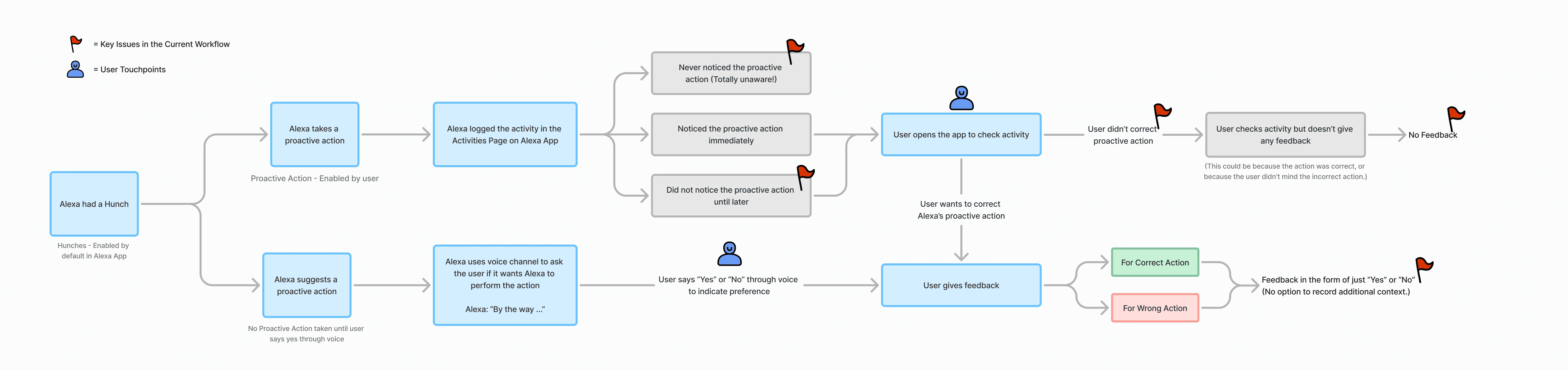
Scroll right to view the entire current Hunches feedback flow that users go through
To Summarize The Problem
I took a two fold approach to breakdown the problems we identified.
problem area 01
Hunches is hard to find and easy to ignore.
Hunches lives under settings, buried away from features like Routines that users interact with regularly. Without a clear entry point or useful notifications, most users never engage with it meaningfully.
Hunches activity is buried four levels deep
To check Hunch activity, users had to navigate four layers into the app. A feature meant to feel proactive and ambient required more effort to access than most users were willing to give.
Hunch notifications don't give users enough control
Without the ability to customize when and how Hunches notify them, users had no reason to pay attention. Notifications felt generic, making it easy to dismiss or ignore the feature altogether.
solution
Hunches need more discoverability.
Alexa users often aren't aware of
What do Hunches actually do?
When does Alexa act on Hunches?
Why does Alexa take a specific proactive action?
insight
Hunches’ Activities Hidden Deep in App Navigation
Action
Display Latest Hunches Upfront on Home Screen


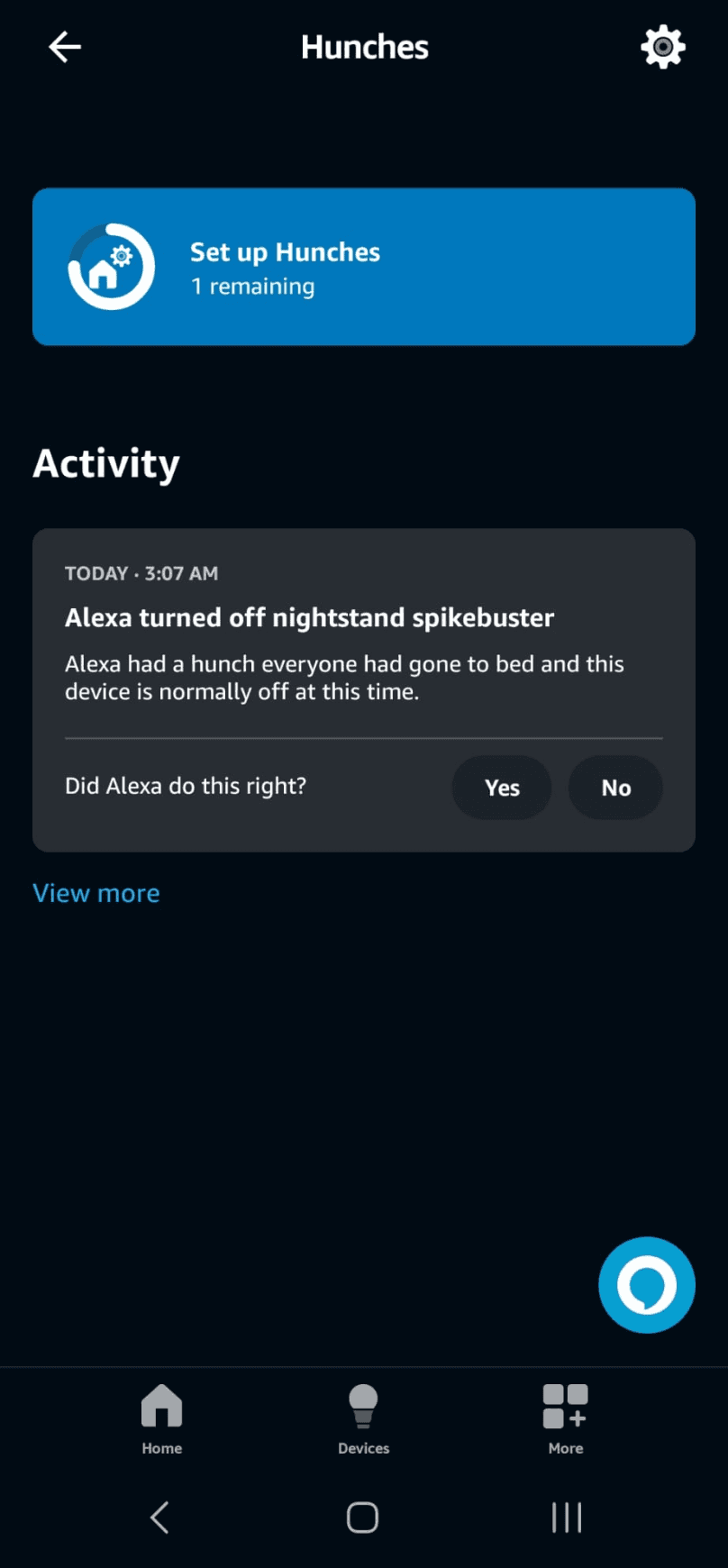
before
Current design requires navigating through 4 layers to access hunches activity
Added ‘Triggered by Hunches’ tag in the device tile to inform users of proactive actions performed on it
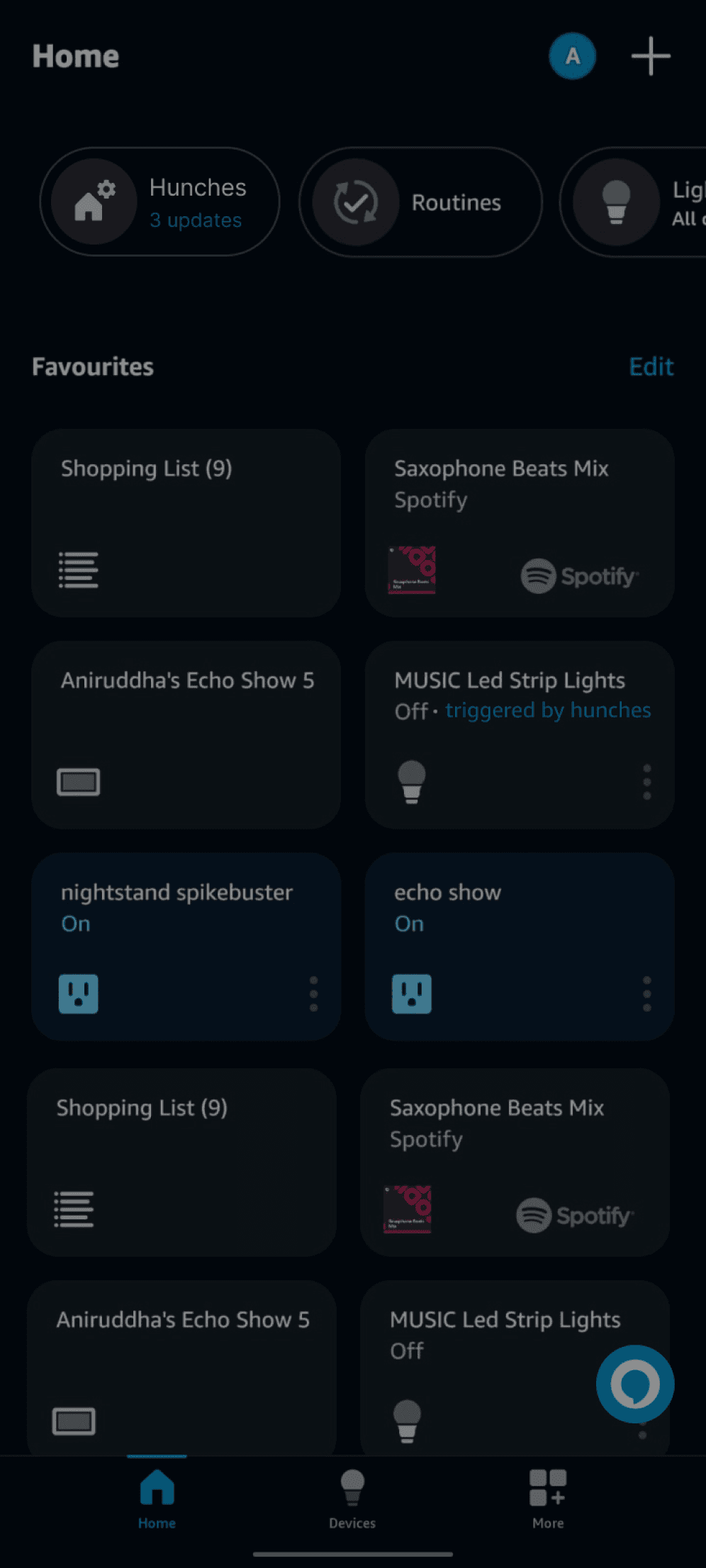
Introduced Hunches on the home screen along with our Alexa Features
Hunches
3 updates

after
Re-designed version of the home screen in Alexa App
insight
Hunch Notifications Need More Customization
Action
Semi-proactive Notifications
For Alexa Echo Show
Pulsating Widget
By leveraging the Echo Show's always-on display, we can grab the user's attention to notify them of proactive actions triggered by Alexa without being intrusive
concept
Current widget
(to invoke alexa)

Hunches
Living Room
At 2AM
Turned lights off

Hunches
Turned lights off
Living Room
Closed Back Door
Kitchen

Hunches
Living Room
At 2AM
Turned lights off
Re-designed widgets
(To invoke Alexa + hunch notifications)
For Alexa Mobile App
Alexa App Widgets
By enhancing Alexa's widget, we integrated hunch notifications to deliver updates on the user's home screen without intrusion
insight
Intrusive notifications are preferred during high-stakes situations
Action
Discarding On/Off Hunches and introducing device level alerts
before
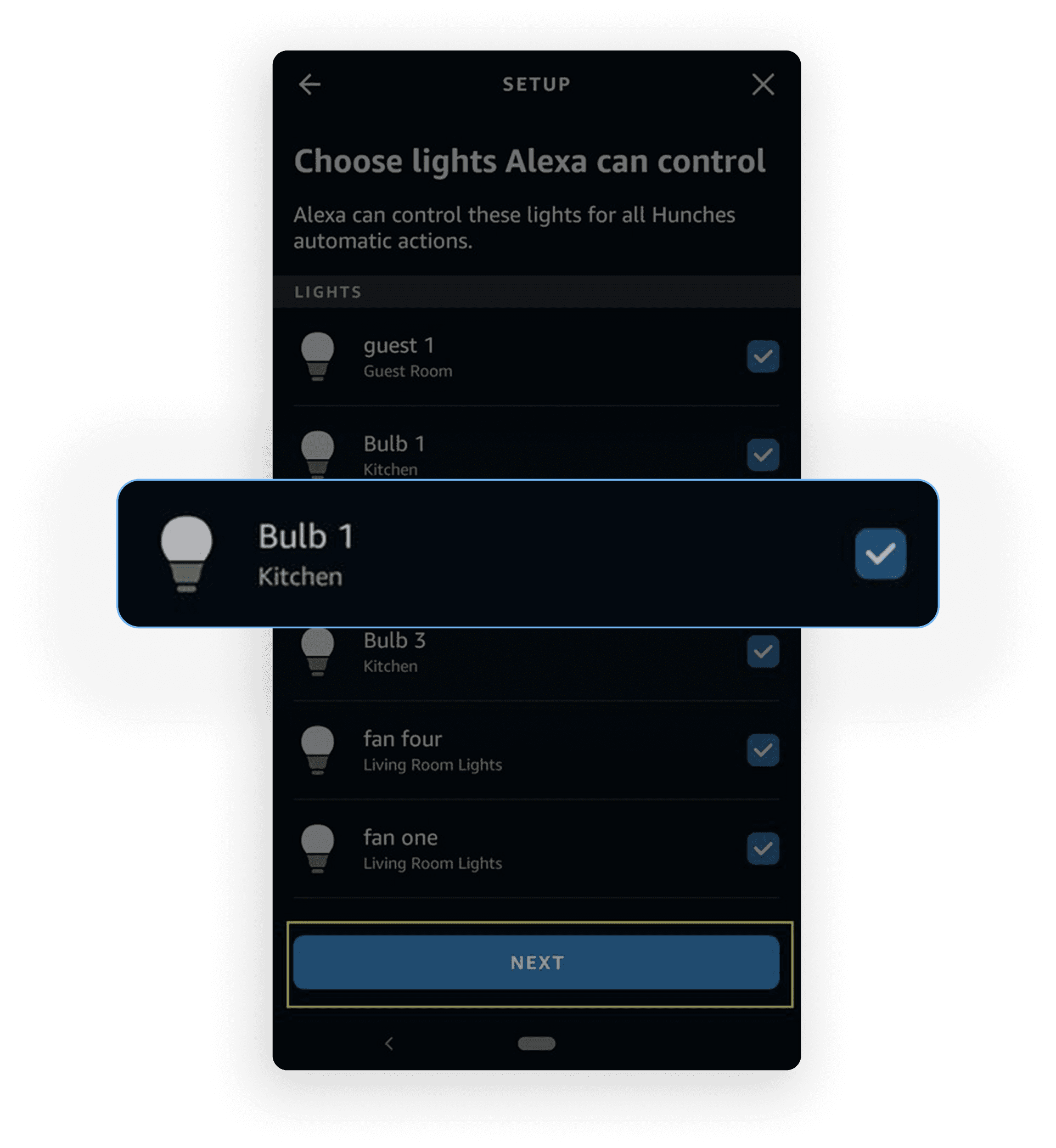
problem
Select devices that can be acted by hunches
after
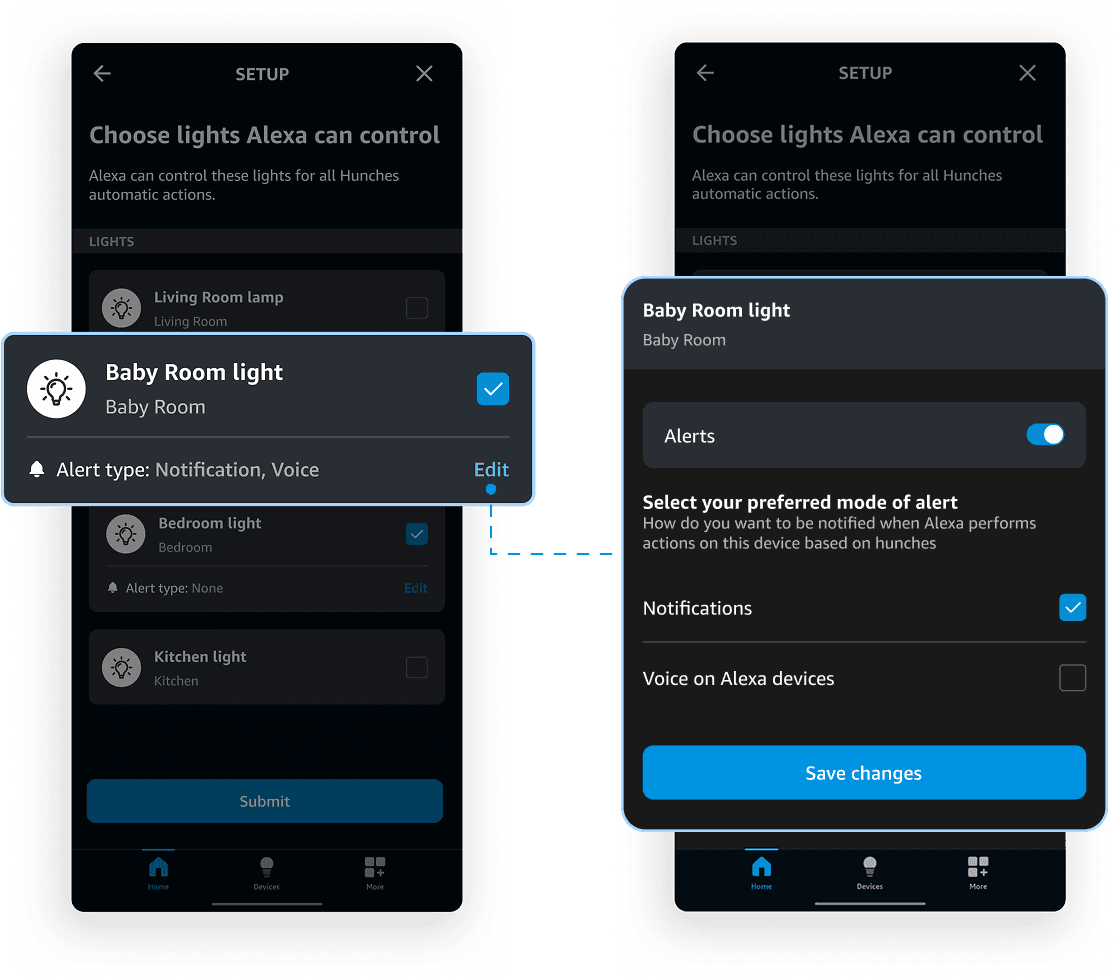
solution
create custom alerts at a device-level
problem area 02
Feedback for hunches is limited
The only feedback option was a yes/no. No context, no acknowledgment, no sense that it mattered. Users took their real feedback to public forums like Reddit instead.
The feedback modal doesn't capture why a hunch was right or wrong
A yes/no prompt tells Alexa nothing about the nuance behind a user's response. Users had more to say but had no way to express it. The timing was off, the hunch was for the wrong person, the action wasn't quite right. The feedback modal needed to support richer, more contextual input.
Users don't see the value in giving feedback at all
When users can't see how their feedback translates into a smarter Alexa, giving it feels pointless. The challenge wasn't just improving the feedback mechanism. It was making the value exchange visible, so users felt their input was actually worth something.
insight
App Provides Insufficient Context for Alexa’s Actions
Action
Gather contextual information from user feedback

User can click on 'Give more info' to provide additional feedback.
option to provide contextual feedback for incorrect alexa actions
concept
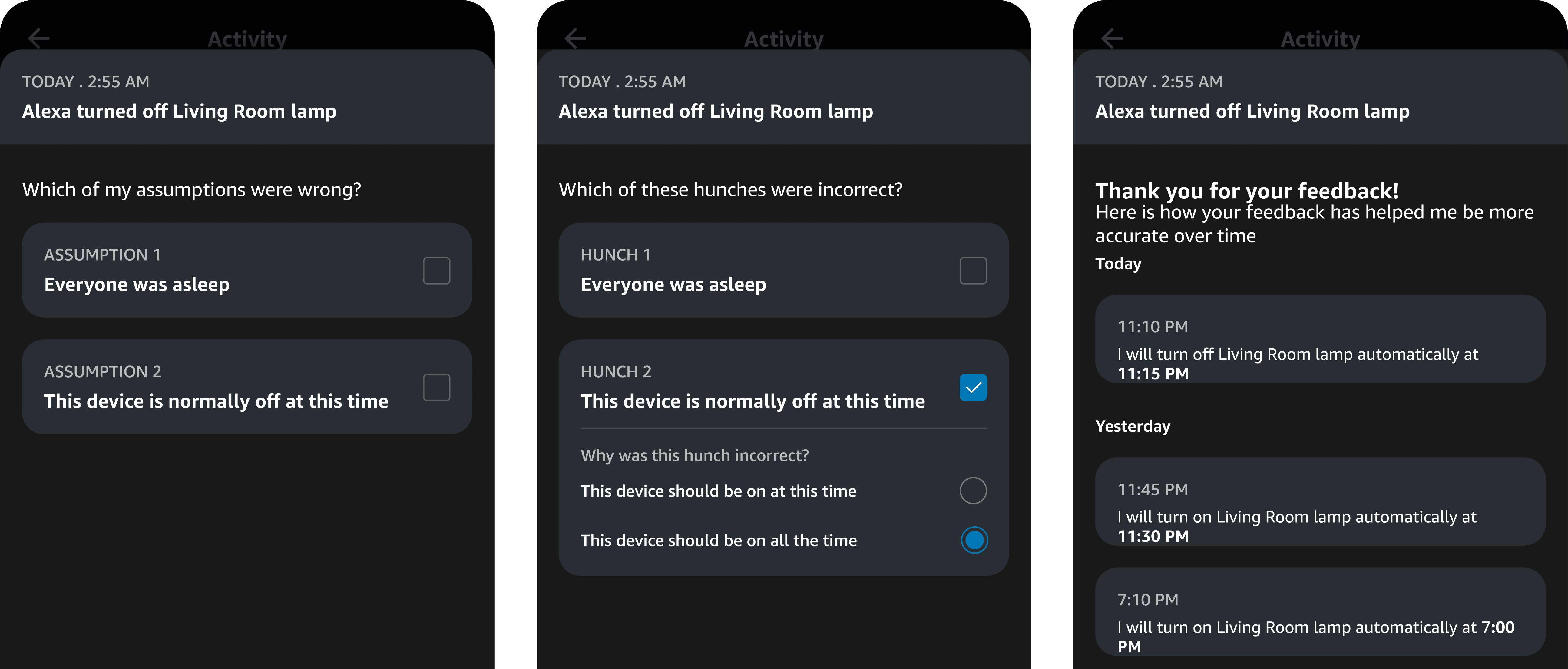
understanding what went wrong with alexa's hunch
insight
Transparent feedback impact increases user engagement
Action
Showcase Alexa’s Hunch model improvement overtime based on user feedback
concept

Rationale
Showcase Impact of feedback over time
Demonstrating Alexa's hunch model enhancements via iterative user feedback to highlight accuracy improvements.
Metrics I’d like to track...
01
Ratio of correct vs. incorrect actions taken by Alexa
02
Frequency of users checking their Alexa action history
03
Number of unprompted feedback submissions from users
04
Comparison between positive and negative feedback submissions (expected to decrease over time as accuracy improves)
Takeaways!
Navigating ambiguity
The brief “improve feedback for Hunches” came with no defined user, problem, or context on what the existing system lacks. That ambiguity pushed me to ask sharper questions, involve the right people early, and surface hidden gaps. It reminded me how much clarity is something you create, not wait for.
Pivots happen! Design is a non-linear process
Midway through designing the feedback modality, we realized our initial direction of voice based feedback wasn’t working. At first, it felt like a setback, but the pivot helped the team realign and move towards a more effective solution. It taught me that even late-stage shifts are worth it if they lead to the right outcome. Delivering the right thing beats sticking to the first idea.
Storytelling is everything
Storytelling became my fastest alignment tool in design crits and stakeholder presentations. Since Hunches were difficult to demonstrate live, I staged before/after moments of a real home environment through Figma animations. This led to better feedback quality and alignment.
Gratitude
Thank you Monica Chan and Colin Gray for mentoring us throughout this project! And, a big thank you to Rohan, Samarth, Snigdha, Shantanu, Matyas, and Mukund for being such an amazing team!


